 Free Chrome extension for Meta Ads Manager
Meta edits your ads behind your back. Undo it in one click.
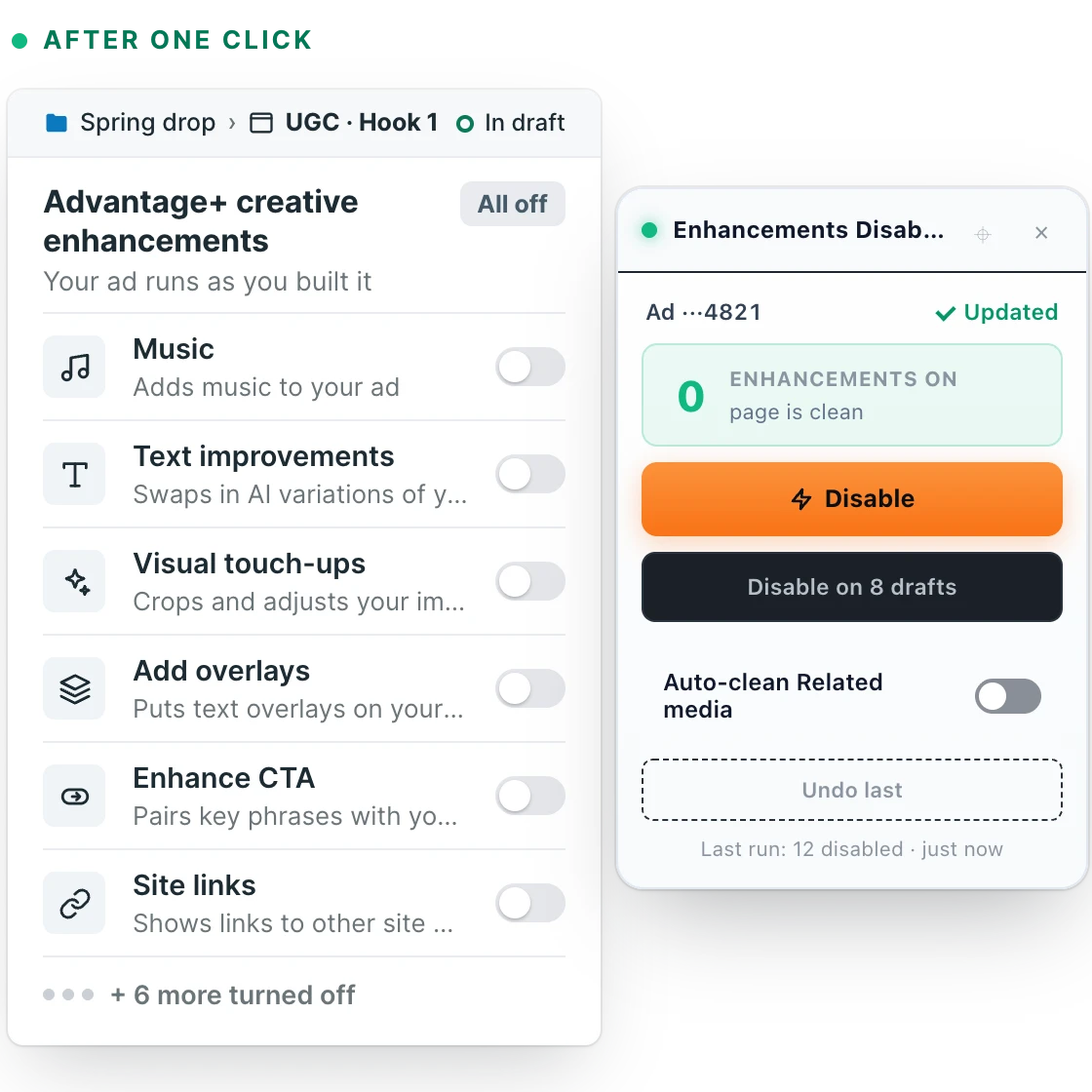
Advantage+ switches on AI “enhancements” for you: music, rewritten text, image edits, overlays, site links. Meta Ads Cleaner shows which ones are on and turns them off, on one ad or on every draft in a campaign.
- Rated 5 out of 5 on the Chrome Web Store
- Free
- No account
- No tracking
- Works only on Meta’s ad pages
Works in Chrome, Edge, Brave and other Chromium browsers · Ads Manager in English, Russian and Ukrainian
Your ad isn’t the ad Meta shows.
Advantage+ creative enhancements are on by default. Meta can lay music over your video, swap your headline for AI variations, re-crop and brighten your images, add overlays and show links and comments you never wrote.
The switches are spread across Advantage+ creative, Creative setup, Personalized destinations and Related media, and they are on again in the next ad you create. Miss one, and your creative test isn’t testing what you think it is.
The extension knows 70 enhancement types. See the full list
Add it once. Clean every ad in one click.
-
1
Add it to Chrome
Free, no sign-up. It only wakes up on Meta’s ad pages and does nothing anywhere else.
Meta Ads Cleaner
Free · No account
-
2
Open any ad
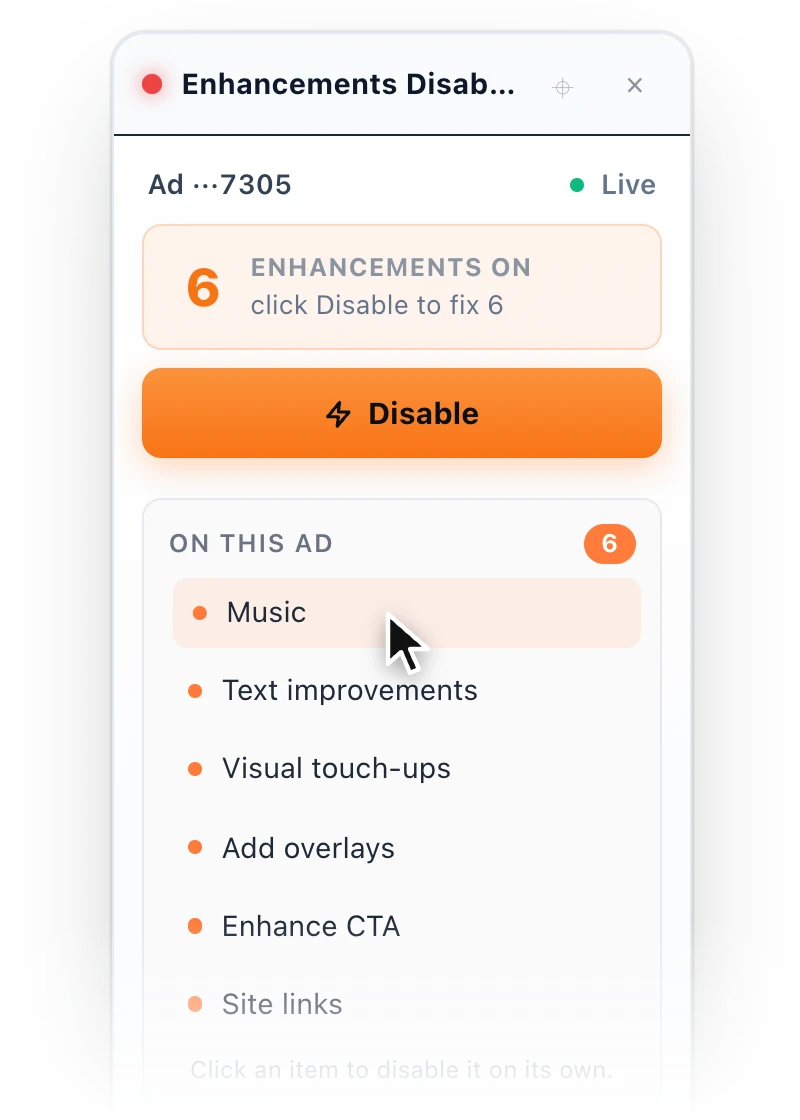
A small widget in the corner of the editor lists every enhancement that’s switched on for this ad.
-
3
Click Disable
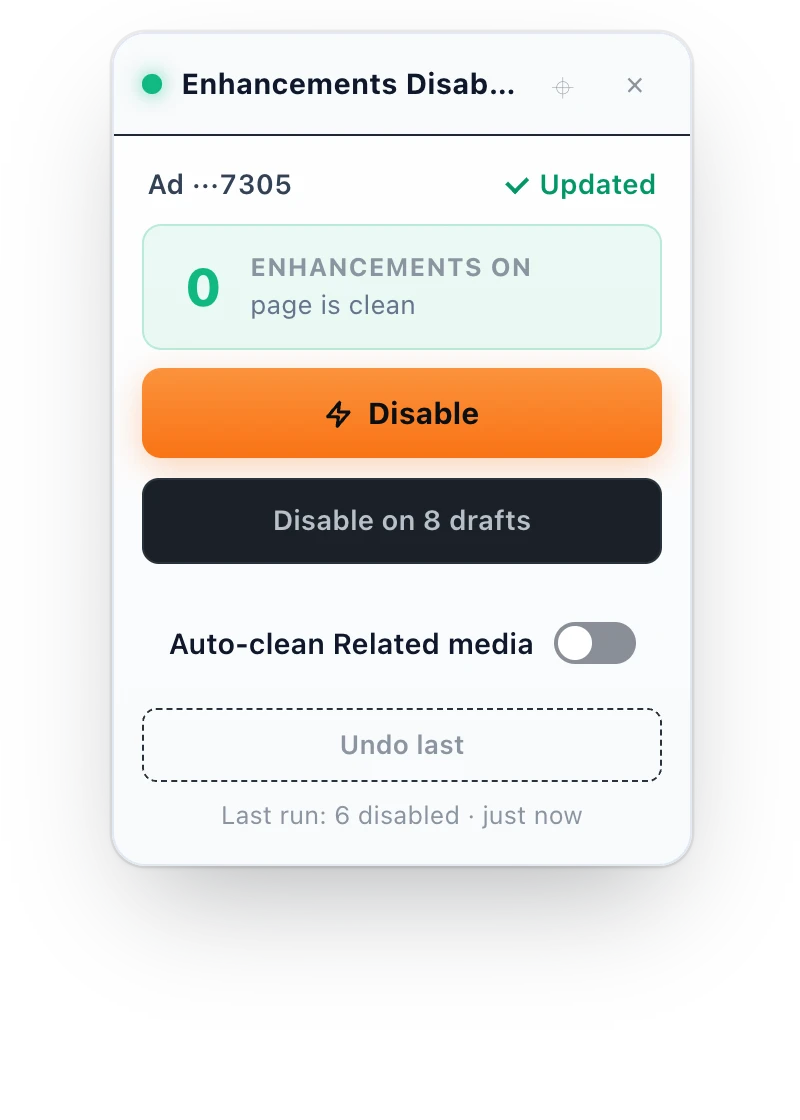
Everything on the list switches off. Or click one item to turn off just that one. Changed your mind? Undo.
See it on an ad in 26 seconds.
No sound. The ad account and numbers are sample data; parts are sped up.
Clean every draft in the campaign
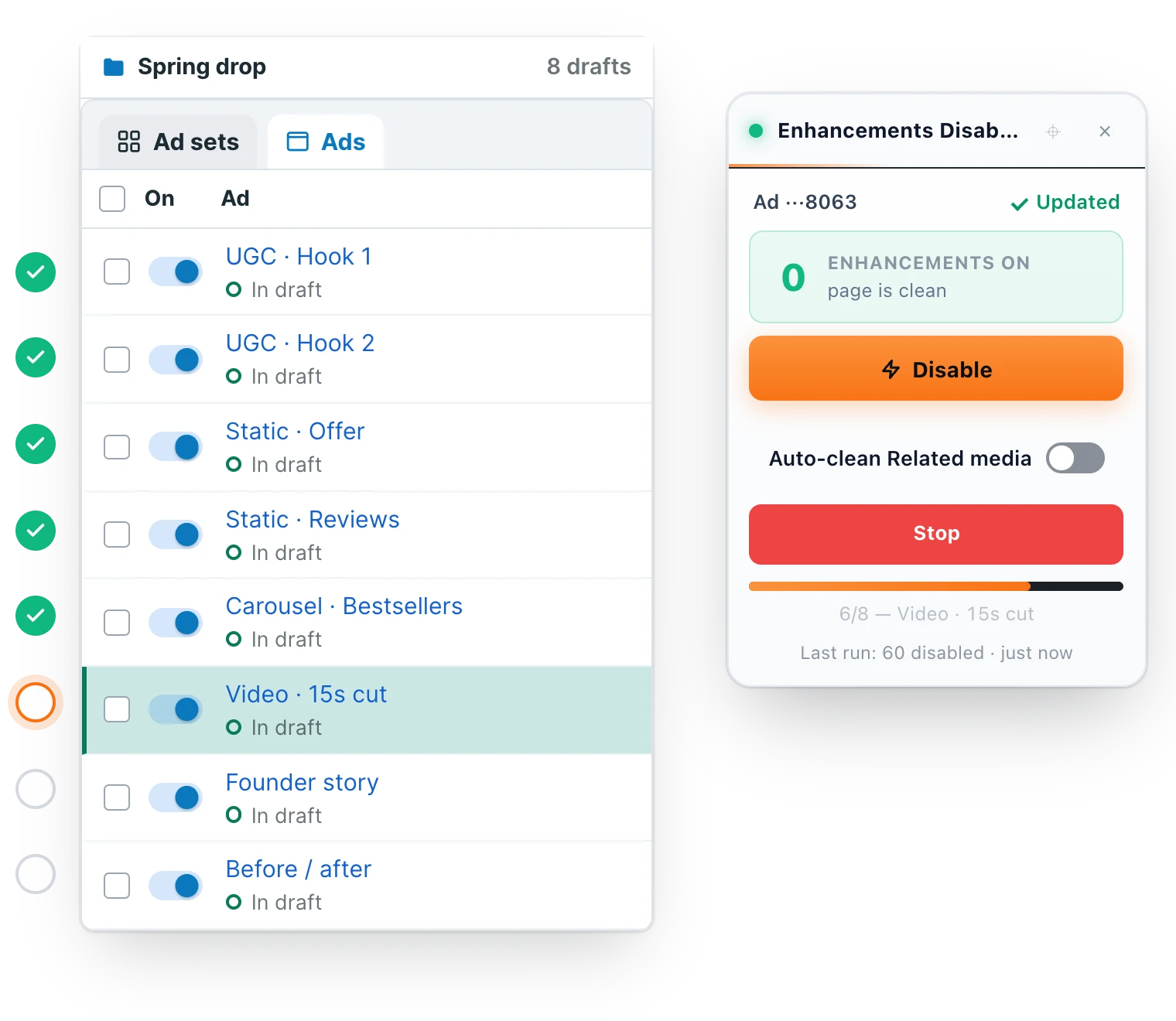
Bulk mode opens the drafts one by one and switches their enhancements off, hands-free. The button always tells you exactly how many ads it will edit, and published ads are only touched if you select them.
- Preview first, or test on one ad
- Skip ads by name or by regex
- Stop at any time
Keep what works, switch off the rest
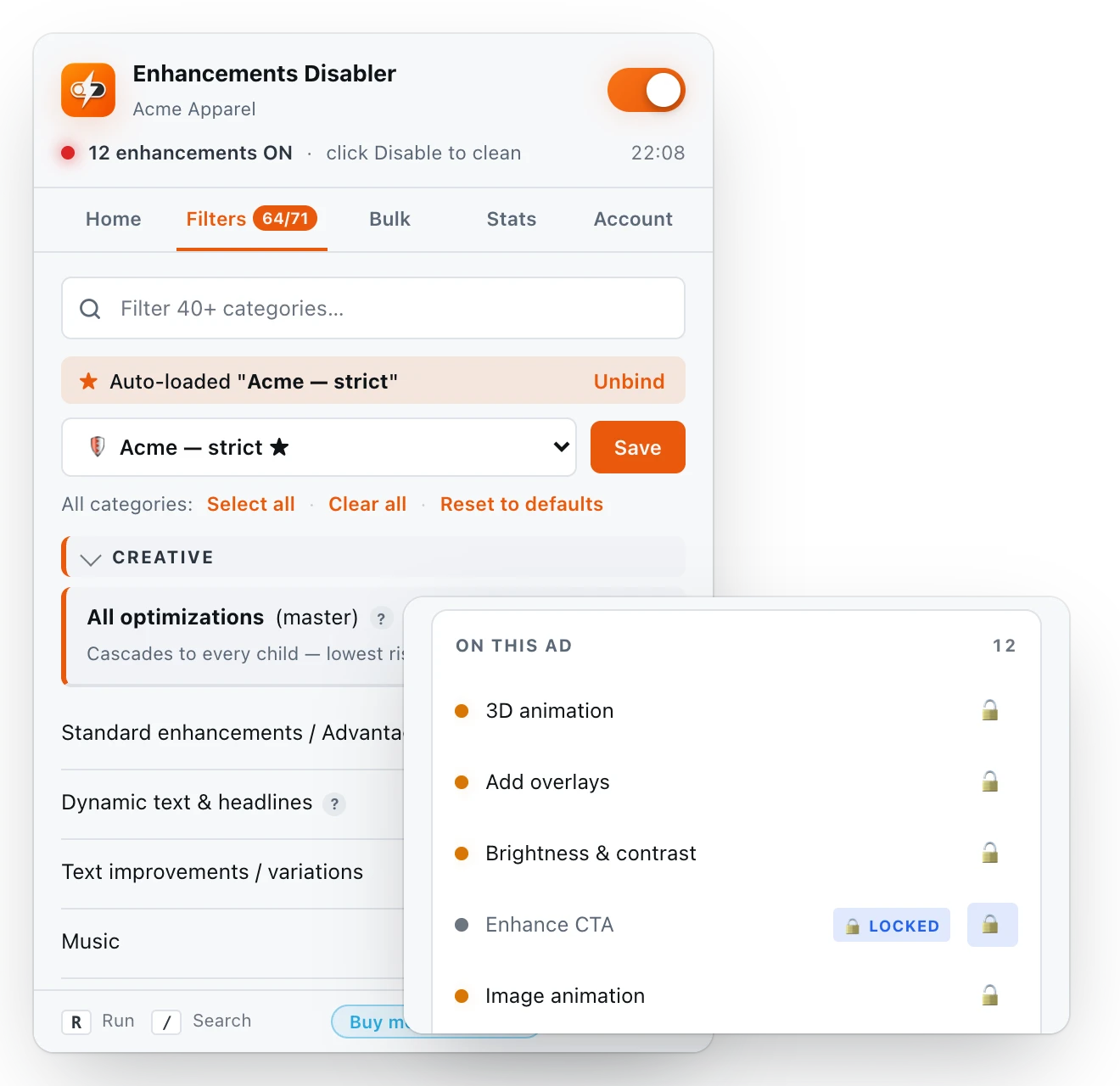
Choose which of the 70 enhancement types the extension turns off. Lock a category so it’s never touched, save presets and bind them to ad accounts. Settings are kept separately for every ad account.
- Presets that load automatically for an ad account
- Locks per ad account or for every account
- Copy settings from one account to another
Nothing it does that you can’t undo
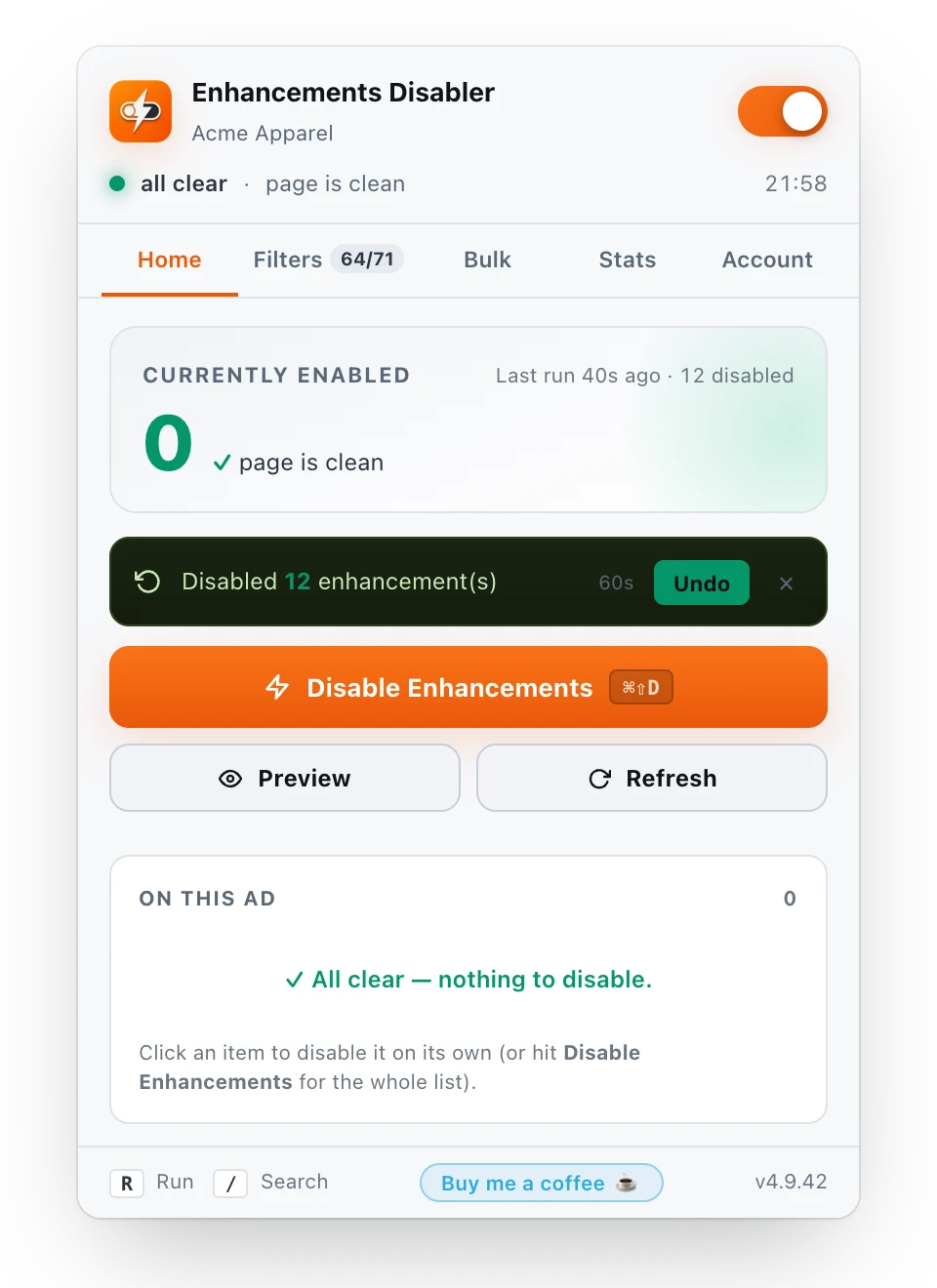
Undo brings back what the last run switched off. The extension never clicks Publish unless you turn on auto-publish, and it never touches the “made with AI” disclosure.
- Pause it for 5, 15 or 60 minutes
- Keyboard shortcut ⌘ ⇧ D or Ctrl Shift D
- Auto-clean of Related media, off until you switch it on
No account
Nothing to sign up for. Install and use it.
No tracking
No analytics and no network requests.
Stays in your browser
Settings live in Chrome’s own storage.
Only on Meta’s ad pages
It does nothing on any other site.
What do the toggles cost you?
Your numbers, your estimate. Move the sliders.
With the extension it’s one click per ad, or one click for every draft in a campaign.
People who got their Mondays back.
Buyers, agency leads, and ecom owners who installed it and stopped paying the Advantage+ tax. Real quotes, real workloads.
"I run 14 accounts for clients. Every Monday: open ad, untick 'Apply all recommendations', dive into Creative setup, kill Music, Shop, Browser add-ons, save, repeat × 60. I lost a whole Friday once just doing this. Now? One click. Per ad. I got my Mondays back."
"WAIT WHAT. I just bulk-cleaned 47 drafts in 4 minutes. Forty-seven. Four minutes. I was literally about to outsource this to a VA for $200/month. Throwing coffee at the dev instead. 🤝"
"Meta every Monday: 'Here's 23 new AI enhancements you definitely want!' Me: cries softly into spreadsheet. This extension: 'I got you.' Best $0 I've ever spent. 10/10."
"Three of my buyers each spend ~45 min/week on this manually. That's ~6 hours/week across the team I just got back. We tried it on one campaign first — bulk across 38 drafts, zero misfires. Sold."
"Finally. Just finally."
"Most 'cleanup' tools fall over the minute Meta renames a toggle. This one has like a million fallback strategies — I checked the source. The pencil-into-sub-modal handling alone is wild. Real work."
Already using it? A short review on the Chrome Web Store helps other buyers find it.
Leave a review
Built by a media buyer, for media buyers
Meta Ads Cleaner started as a fix for one annoyance: Meta rewriting headlines, re-cropping images and laying music over edits that were finished. Every feature in it exists because Meta added a toggle nobody asked for.
Found a toggle it doesn’t catch yet? Write to support@ads-cleaner.com and it goes into the next release.
Dmytro Kozhanov, maker of Meta Ads Cleaner
Connect on LinkedInQuestions before you install
How do I turn off Advantage+ enhancements in Meta Ads Manager by hand?
Open the ad in the editor, find the Advantage+ creative (or Standard enhancements) card under Ad setup, click Edit and switch each enhancement off. Then do the same in Creative setup (Website highlights, Promotions, Site links, Summaries), Personalized destinations (Shop, Browser add-ons, Product browsing) and Related media, and save.
Every card is covered in the step-by-step guide; every switch is on the enhancements page.
Is it free?
Yes. Every feature is free, with no account and no paywall. The Buy me a coffee link is optional.
Can it get my ad account banned?
It clicks the same switches you would click in Ads Manager and never uses the Meta API, so the risk is the same as turning them off by hand.
Does it publish my ads?
No. It never clicks Publish unless you switch on Auto-publish in the Bulk tab, which is off by default.
What data does it collect?
None leaves your browser. No analytics, no remote servers, no network requests. Settings are kept in Chrome’s own storage. Details are in the Privacy Policy.
Can I keep some enhancements on?
Yes. Untick a category in the Filters tab and the extension skips it, or lock it for one ad account so it is never touched. Presets save a set of choices and can load automatically for an ad account.
Does it work in Business Suite and other browsers?
It works in Ads Manager, in the ad editor inside Business Suite and on Meta’s regional domains, in Chrome, Edge, Brave and other Chromium browsers. The widget appears only inside an ad’s edit screen.
What about Advantage+ shopping campaigns?
Those campaigns are built around Advantage+ automation. The extension is meant for regular sales, leads and traffic campaigns where Meta switched creative enhancements on by default.
Meta added a toggle the extension doesn’t catch. What now?
The popup’s Account tab lists new toggles the extension found but doesn’t recognise yet. Send them to support@ads-cleaner.com and they go into the next release.